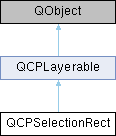
Provides rect/rubber-band data selection and range zoom interaction. More...
Signals | |
| void | started (QMouseEvent *event) |
| This signal is emitted when a selection rect interaction was initiated, i.e. | |
| void | changed (const QRect &rect, QMouseEvent *event) |
| This signal is emitted while the selection rect interaction is ongoing and the rect has changed its size due to the user moving the mouse. | |
| void | canceled (const QRect &rect, QInputEvent *event) |
| This signal is emitted when the selection interaction was cancelled. | |
| void | accepted (const QRect &rect, QMouseEvent *event) |
| This signal is emitted when the selection interaction was completed by the user releasing the mouse button. | |
 Signals inherited from QCPLayerable Signals inherited from QCPLayerable | |
| void | layerChanged (QCPLayer *newLayer) |
| This signal is emitted when the layer of this layerable changes, i.e. | |
Public Member Functions | |
| QCPSelectionRect (QCustomPlot *parentPlot) | |
| Creates a new QCPSelectionRect instance. | |
| QRect | rect () const |
| QCPRange | range (const QCPAxis *axis) const |
| A convenience function which returns the coordinate range of the provided axis, that this selection rect currently encompasses. | |
| QPen | pen () const |
| QBrush | brush () const |
| bool | isActive () const |
| Returns true if there is currently a selection going on, i.e. | |
| void | setPen (const QPen &pen) |
| Sets the pen that will be used to draw the selection rect outline. | |
| void | setBrush (const QBrush &brush) |
| Sets the brush that will be used to fill the selection rect. | |
| Q_SLOT void | cancel () |
| If there is currently a selection interaction going on (isActive), the interaction is canceled. | |
| Public Member Functions inherited from QCPLayerable | |
| QCPLayerable (QCustomPlot *plot, QString targetLayer=QString(), QCPLayerable *parentLayerable=0) | |
| Creates a new QCPLayerable instance. | |
| bool | visible () const |
| QCustomPlot * | parentPlot () const |
| QCPLayerable * | parentLayerable () const |
| Returns the parent layerable of this layerable. | |
| QCPLayer * | layer () const |
| bool | antialiased () const |
| void | setVisible (bool on) |
| Sets the visibility of this layerable object. | |
| Q_SLOT bool | setLayer (QCPLayer *layer) |
| Sets the layer of this layerable object. | |
| bool | setLayer (const QString &layerName) |
| This is an overloaded member function, provided for convenience. It differs from the above function only in what argument(s) it accepts. Sets the layer of this layerable object by name. | |
| void | setAntialiased (bool enabled) |
| Sets whether this object will be drawn antialiased or not. | |
| virtual double | selectTest (const QPointF &pos, bool onlySelectable, QVariant *details=0) const |
| This function is used to decide whether a click hits a layerable object or not. | |
| bool | realVisibility () const |
| Returns whether this layerable is visible, taking the visibility of the layerable parent and the visibility of this layerable's layer into account. | |
Protected Member Functions | |
| virtual void | startSelection (QMouseEvent *event) |
| virtual void | moveSelection (QMouseEvent *event) |
| virtual void | endSelection (QMouseEvent *event) |
| virtual void | keyPressEvent (QKeyEvent *event) |
| virtual void | applyDefaultAntialiasingHint (QCPPainter *painter) const Q_DECL_OVERRIDE |
| virtual void | draw (QCPPainter *painter) Q_DECL_OVERRIDE |
| Protected Member Functions inherited from QCPLayerable | |
| virtual void | parentPlotInitialized (QCustomPlot *parentPlot) |
| virtual QCP::Interaction | selectionCategory () const |
| virtual QRect | clipRect () const |
| virtual void | applyDefaultAntialiasingHint (QCPPainter *painter) const =0 |
| virtual void | draw (QCPPainter *painter)=0 |
| virtual void | selectEvent (QMouseEvent *event, bool additive, const QVariant &details, bool *selectionStateChanged) |
| virtual void | deselectEvent (bool *selectionStateChanged) |
| virtual void | mousePressEvent (QMouseEvent *event, const QVariant &details) |
| This event gets called when the user presses a mouse button while the cursor is over the layerable. | |
| virtual void | mouseMoveEvent (QMouseEvent *event, const QPointF &startPos) |
| This event gets called when the user moves the mouse while holding a mouse button, after this layerable has become the mouse grabber by accepting the preceding mousePressEvent. | |
| virtual void | mouseReleaseEvent (QMouseEvent *event, const QPointF &startPos) |
| This event gets called when the user releases the mouse button, after this layerable has become the mouse grabber by accepting the preceding mousePressEvent. | |
| virtual void | mouseDoubleClickEvent (QMouseEvent *event, const QVariant &details) |
| This event gets called when the user presses the mouse button a second time in a double-click, while the cursor is over the layerable. | |
| virtual void | wheelEvent (QWheelEvent *event) |
| This event gets called when the user turns the mouse scroll wheel while the cursor is over the layerable. | |
| void | initializeParentPlot (QCustomPlot *parentPlot) |
| void | setParentLayerable (QCPLayerable *parentLayerable) |
| bool | moveToLayer (QCPLayer *layer, bool prepend) |
| void | applyAntialiasingHint (QCPPainter *painter, bool localAntialiased, QCP::AntialiasedElement overrideElement) const |
Protected Attributes | |
| QRect | mRect |
| QPen | mPen |
| QBrush | mBrush |
| bool | mActive |
| Protected Attributes inherited from QCPLayerable | |
| bool | mVisible |
| QCustomPlot * | mParentPlot |
| QPointer< QCPLayerable > | mParentLayerable |
| QCPLayer * | mLayer |
| bool | mAntialiased |
Friends | |
| class | QCustomPlot |
Detailed Description
Provides rect/rubber-band data selection and range zoom interaction.
QCPSelectionRect is used by QCustomPlot when the QCustomPlot::setSelectionRectMode is not QCP::srmNone. When the user drags the mouse across the plot, the current selection rect instance (QCustomPlot::setSelectionRect) is forwarded these events and makes sure an according rect shape is drawn. At the begin, during, and after completion of the interaction, it emits the corresponding signals started, changed, canceled, and accepted.
The QCustomPlot instance connects own slots to the current selection rect instance, in order to react to an accepted selection rect interaction accordingly.
isActive can be used to check whether the selection rect is currently active. An ongoing selection interaction can be cancelled programmatically via calling cancel at any time.
The appearance of the selection rect can be controlled via setPen and setBrush.
If you wish to provide custom behaviour, e.g. a different visual representation of the selection rect (QCPSelectionRect::draw), you can subclass QCPSelectionRect and pass an instance of your subclass to QCustomPlot::setSelectionRect.
Constructor & Destructor Documentation
◆ QCPSelectionRect()
|
explicit |
Creates a new QCPSelectionRect instance.
To make QCustomPlot use the selection rect instance, pass it to QCustomPlot::setSelectionRect. parentPlot should be set to the same QCustomPlot widget.
Member Function Documentation
◆ accepted
|
signal |
This signal is emitted when the selection interaction was completed by the user releasing the mouse button.
Note that rect may have a negative width or height, if the selection is being dragged to the upper or left side of the selection rect origin.
◆ applyDefaultAntialiasingHint()
|
protectedvirtual |
Implements QCPLayerable.
◆ cancel()
| void QCPSelectionRect::cancel | ( | ) |
◆ canceled
|
signal |
This signal is emitted when the selection interaction was cancelled.
Note that event is 0 if the selection interaction was cancelled programmatically, by a call to cancel.
The user may cancel the selection interaction by pressing the escape key. In this case, event holds the respective input event.
Note that rect may have a negative width or height, if the selection is being dragged to the upper or left side of the selection rect origin.
◆ changed
|
signal |
This signal is emitted while the selection rect interaction is ongoing and the rect has changed its size due to the user moving the mouse.
Note that rect may have a negative width or height, if the selection is being dragged to the upper or left side of the selection rect origin.
◆ draw()
|
protectedvirtual |
Implements QCPLayerable.
◆ isActive()
|
inline |
Returns true if there is currently a selection going on, i.e.
the user has started dragging a selection rect, but hasn't released the mouse button yet.
- See also
- cancel
◆ setBrush()
| void QCPSelectionRect::setBrush | ( | const QBrush & | brush | ) |
Sets the brush that will be used to fill the selection rect.
By default the selection rect is not filled, i.e. brush is Qt::NoBrush.
- See also
- setPen
◆ setPen()
| void QCPSelectionRect::setPen | ( | const QPen & | pen | ) |
Sets the pen that will be used to draw the selection rect outline.
- See also
- setBrush
◆ started
|
signal |
This signal is emitted when a selection rect interaction was initiated, i.e.
the user just started dragging the selection rect with the mouse.
The documentation for this class was generated from the following files:
- qcustomplot.h
- qcustomplot.cpp
