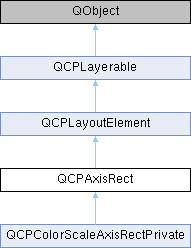
Holds multiple axes and arranges them in a rectangular shape. More...
Public Member Functions | |
| QCPAxisRect (QCustomPlot *parentPlot, bool setupDefaultAxes=true) | |
| Creates a QCPAxisRect instance and sets default values. | |
| QPixmap | background () const |
| QBrush | backgroundBrush () const |
| bool | backgroundScaled () const |
| Qt::AspectRatioMode | backgroundScaledMode () const |
| Qt::Orientations | rangeDrag () const |
| Qt::Orientations | rangeZoom () const |
| QCPAxis * | rangeDragAxis (Qt::Orientation orientation) |
| Returns the range drag axis of the orientation provided. | |
| QCPAxis * | rangeZoomAxis (Qt::Orientation orientation) |
| Returns the range zoom axis of the orientation provided. | |
| QList< QCPAxis * > | rangeDragAxes (Qt::Orientation orientation) |
| Returns all range drag axes of the orientation provided. | |
| QList< QCPAxis * > | rangeZoomAxes (Qt::Orientation orientation) |
| Returns all range zoom axes of the orientation provided. | |
| double | rangeZoomFactor (Qt::Orientation orientation) |
| Returns the range zoom factor of the orientation provided. | |
| void | setBackground (const QPixmap &pm) |
| Sets pm as the axis background pixmap. | |
| void | setBackground (const QPixmap &pm, bool scaled, Qt::AspectRatioMode mode=Qt::KeepAspectRatioByExpanding) |
| This is an overloaded member function, provided for convenience. It differs from the above function only in what argument(s) it accepts.Allows setting the background pixmap of the axis rect, whether it shall be scaled and how it shall be scaled in one call. | |
| void | setBackground (const QBrush &brush) |
| This is an overloaded member function, provided for convenience. It differs from the above function only in what argument(s) it accepts.Sets brush as the background brush. | |
| void | setBackgroundScaled (bool scaled) |
| Sets whether the axis background pixmap shall be scaled to fit the axis rect or not. | |
| void | setBackgroundScaledMode (Qt::AspectRatioMode mode) |
| If scaling of the axis background pixmap is enabled (setBackgroundScaled), use this function to define whether and how the aspect ratio of the original pixmap passed to setBackground is preserved. | |
| void | setRangeDrag (Qt::Orientations orientations) |
| Sets which axis orientation may be range dragged by the user with mouse interaction. | |
| void | setRangeZoom (Qt::Orientations orientations) |
| Sets which axis orientation may be zoomed by the user with the mouse wheel. | |
| void | setRangeDragAxes (QCPAxis *horizontal, QCPAxis *vertical) |
| This is an overloaded member function, provided for convenience. It differs from the above function only in what argument(s) it accepts.Sets the axes whose range will be dragged when setRangeDrag enables mouse range dragging on the QCustomPlot widget. | |
| void | setRangeDragAxes (QList< QCPAxis * > axes) |
| This is an overloaded member function, provided for convenience. It differs from the above function only in what argument(s) it accepts.This method allows to set up multiple axes to react to horizontal and vertical dragging. | |
| void | setRangeDragAxes (QList< QCPAxis * > horizontal, QList< QCPAxis * > vertical) |
| This is an overloaded member function, provided for convenience. It differs from the above function only in what argument(s) it accepts.This method allows to set multiple axes up to react to horizontal and vertical dragging, and define specifically which axis reacts to which drag orientation (irrespective of the axis orientation). | |
| void | setRangeZoomAxes (QCPAxis *horizontal, QCPAxis *vertical) |
| Sets the axes whose range will be zoomed when setRangeZoom enables mouse wheel zooming on the QCustomPlot widget. | |
| void | setRangeZoomAxes (QList< QCPAxis * > axes) |
| This is an overloaded member function, provided for convenience. It differs from the above function only in what argument(s) it accepts.This method allows to set up multiple axes to react to horizontal and vertical range zooming. | |
| void | setRangeZoomAxes (QList< QCPAxis * > horizontal, QList< QCPAxis * > vertical) |
| This is an overloaded member function, provided for convenience. It differs from the above function only in what argument(s) it accepts.This method allows to set multiple axes up to react to horizontal and vertical zooming, and define specifically which axis reacts to which zoom orientation (irrespective of the axis orientation). | |
| void | setRangeZoomFactor (double horizontalFactor, double verticalFactor) |
| Sets how strong one rotation step of the mouse wheel zooms, when range zoom was activated with setRangeZoom. | |
| void | setRangeZoomFactor (double factor) |
| This is an overloaded member function, provided for convenience. It differs from the above function only in what argument(s) it accepts.Sets both the horizontal and vertical zoom factor. | |
| int | axisCount (QCPAxis::AxisType type) const |
| Returns the number of axes on the axis rect side specified with type. | |
| QCPAxis * | axis (QCPAxis::AxisType type, int index=0) const |
| Returns the axis with the given index on the axis rect side specified with type. | |
| QList< QCPAxis * > | axes (QCPAxis::AxisTypes types) const |
| Returns all axes on the axis rect sides specified with types. | |
| QList< QCPAxis * > | axes () const |
| This is an overloaded member function, provided for convenience. It differs from the above function only in what argument(s) it accepts.Returns all axes of this axis rect. | |
| QCPAxis * | addAxis (QCPAxis::AxisType type, QCPAxis *axis=0) |
| Adds a new axis to the axis rect side specified with type, and returns it. | |
| QList< QCPAxis * > | addAxes (QCPAxis::AxisTypes types) |
| Adds a new axis with addAxis to each axis rect side specified in types. | |
| bool | removeAxis (QCPAxis *axis) |
| Removes the specified axis from the axis rect and deletes it. | |
| QCPLayoutInset * | insetLayout () const |
| Returns the inset layout of this axis rect. | |
| void | zoom (const QRectF &pixelRect) |
| Zooms in (or out) to the passed rectangular region pixelRect, given in pixel coordinates. | |
| void | zoom (const QRectF &pixelRect, const QList< QCPAxis * > &affectedAxes) |
| This is an overloaded member function, provided for convenience. It differs from the above function only in what argument(s) it accepts.Zooms in (or out) to the passed rectangular region pixelRect, given in pixel coordinates. | |
| void | setupFullAxesBox (bool connectRanges=false) |
| Convenience function to create an axis on each side that doesn't have any axes yet and set their visibility to true. | |
| QList< QCPAbstractPlottable * > | plottables () const |
| Returns a list of all the plottables that are associated with this axis rect. | |
| QList< QCPGraph * > | graphs () const |
| Returns a list of all the graphs that are associated with this axis rect. | |
| QList< QCPAbstractItem * > | items () const |
| Returns a list of all the items that are associated with this axis rect. | |
| int | left () const |
| Returns the pixel position of the left border of this axis rect. | |
| int | right () const |
| Returns the pixel position of the right border of this axis rect. | |
| int | top () const |
| Returns the pixel position of the top border of this axis rect. | |
| int | bottom () const |
| Returns the pixel position of the bottom border of this axis rect. | |
| int | width () const |
| Returns the pixel width of this axis rect. | |
| int | height () const |
| Returns the pixel height of this axis rect. | |
| QSize | size () const |
| Returns the pixel size of this axis rect. | |
| QPoint | topLeft () const |
| Returns the top left corner of this axis rect in pixels. | |
| QPoint | topRight () const |
| Returns the top right corner of this axis rect in pixels. | |
| QPoint | bottomLeft () const |
| Returns the bottom left corner of this axis rect in pixels. | |
| QPoint | bottomRight () const |
| Returns the bottom right corner of this axis rect in pixels. | |
| QPoint | center () const |
| Returns the center of this axis rect in pixels. | |
| virtual void | update (UpdatePhase phase) Q_DECL_OVERRIDE |
| This method is called automatically upon replot and doesn't need to be called by users of QCPAxisRect. | |
| virtual QList< QCPLayoutElement * > | elements (bool recursive) const Q_DECL_OVERRIDE |
| Returns a list of all child elements in this layout element. | |
 Public Member Functions inherited from QCPLayoutElement Public Member Functions inherited from QCPLayoutElement | |
| QCPLayoutElement (QCustomPlot *parentPlot=0) | |
| Creates an instance of QCPLayoutElement and sets default values. | |
| QCPLayout * | layout () const |
| Returns the parent layout of this layout element. | |
| QRect | rect () const |
| Returns the inner rect of this layout element. | |
| QRect | outerRect () const |
| Returns the outer rect of this layout element. | |
| QMargins | margins () const |
| QMargins | minimumMargins () const |
| QCP::MarginSides | autoMargins () const |
| QSize | minimumSize () const |
| QSize | maximumSize () const |
| SizeConstraintRect | sizeConstraintRect () const |
| QCPMarginGroup * | marginGroup (QCP::MarginSide side) const |
| QHash< QCP::MarginSide, QCPMarginGroup * > | marginGroups () const |
| void | setOuterRect (const QRect &rect) |
| Sets the outer rect of this layout element. | |
| void | setMargins (const QMargins &margins) |
| Sets the margins of this layout element. | |
| void | setMinimumMargins (const QMargins &margins) |
| If setAutoMargins is enabled on some or all margins, this function is used to provide minimum values for those margins. | |
| void | setAutoMargins (QCP::MarginSides sides) |
| Sets on which sides the margin shall be calculated automatically. | |
| void | setMinimumSize (const QSize &size) |
| Sets the minimum size of this layout element. | |
| void | setMinimumSize (int width, int height) |
| This is an overloaded member function, provided for convenience. It differs from the above function only in what argument(s) it accepts.Sets the minimum size of this layout element. | |
| void | setMaximumSize (const QSize &size) |
| Sets the maximum size of this layout element. | |
| void | setMaximumSize (int width, int height) |
| This is an overloaded member function, provided for convenience. It differs from the above function only in what argument(s) it accepts.Sets the maximum size of this layout element. | |
| void | setSizeConstraintRect (SizeConstraintRect constraintRect) |
| Sets to which rect of a layout element the size constraints apply. | |
| void | setMarginGroup (QCP::MarginSides sides, QCPMarginGroup *group) |
| Sets the margin group of the specified margin sides. | |
| virtual void | update (UpdatePhase phase) |
| Updates the layout element and sub-elements. | |
| virtual QSize | minimumOuterSizeHint () const |
| Returns the suggested minimum size this layout element (the outerRect) may be compressed to, if no manual minimum size is set. | |
| virtual QSize | maximumOuterSizeHint () const |
| Returns the suggested maximum size this layout element (the outerRect) may be expanded to, if no manual maximum size is set. | |
| virtual QList< QCPLayoutElement * > | elements (bool recursive) const |
| Returns a list of all child elements in this layout element. | |
| virtual double | selectTest (const QPointF &pos, bool onlySelectable, QVariant *details=0) const Q_DECL_OVERRIDE |
| Layout elements are sensitive to events inside their outer rect. | |
| Public Member Functions inherited from QCPLayerable | |
| QCPLayerable (QCustomPlot *plot, QString targetLayer=QString(), QCPLayerable *parentLayerable=0) | |
| Creates a new QCPLayerable instance. | |
| bool | visible () const |
| QCustomPlot * | parentPlot () const |
| QCPLayerable * | parentLayerable () const |
| Returns the parent layerable of this layerable. | |
| QCPLayer * | layer () const |
| bool | antialiased () const |
| void | setVisible (bool on) |
| Sets the visibility of this layerable object. | |
| Q_SLOT bool | setLayer (QCPLayer *layer) |
| Sets the layer of this layerable object. | |
| bool | setLayer (const QString &layerName) |
| This is an overloaded member function, provided for convenience. It differs from the above function only in what argument(s) it accepts. Sets the layer of this layerable object by name. | |
| void | setAntialiased (bool enabled) |
| Sets whether this object will be drawn antialiased or not. | |
| virtual double | selectTest (const QPointF &pos, bool onlySelectable, QVariant *details=0) const |
| This function is used to decide whether a click hits a layerable object or not. | |
| bool | realVisibility () const |
| Returns whether this layerable is visible, taking the visibility of the layerable parent and the visibility of this layerable's layer into account. | |
Protected Member Functions | |
| virtual void | applyDefaultAntialiasingHint (QCPPainter *painter) const Q_DECL_OVERRIDE |
| virtual void | draw (QCPPainter *painter) Q_DECL_OVERRIDE |
| virtual int | calculateAutoMargin (QCP::MarginSide side) Q_DECL_OVERRIDE |
| virtual void | layoutChanged () Q_DECL_OVERRIDE |
| virtual void | mousePressEvent (QMouseEvent *event, const QVariant &details) Q_DECL_OVERRIDE |
| This event gets called when the user presses a mouse button while the cursor is over the layerable. | |
| virtual void | mouseMoveEvent (QMouseEvent *event, const QPointF &startPos) Q_DECL_OVERRIDE |
| This event gets called when the user moves the mouse while holding a mouse button, after this layerable has become the mouse grabber by accepting the preceding mousePressEvent. | |
| virtual void | mouseReleaseEvent (QMouseEvent *event, const QPointF &startPos) Q_DECL_OVERRIDE |
| This event gets called when the user releases the mouse button, after this layerable has become the mouse grabber by accepting the preceding mousePressEvent. | |
| virtual void | wheelEvent (QWheelEvent *event) Q_DECL_OVERRIDE |
| This event gets called when the user turns the mouse scroll wheel while the cursor is over the layerable. | |
| void | drawBackground (QCPPainter *painter) |
| void | updateAxesOffset (QCPAxis::AxisType type) |
| Protected Member Functions inherited from QCPLayoutElement | |
| virtual int | calculateAutoMargin (QCP::MarginSide side) |
| virtual void | layoutChanged () |
| virtual void | applyDefaultAntialiasingHint (QCPPainter *painter) const Q_DECL_OVERRIDE |
| virtual void | draw (QCPPainter *painter) Q_DECL_OVERRIDE |
| virtual void | parentPlotInitialized (QCustomPlot *parentPlot) Q_DECL_OVERRIDE |
| Protected Member Functions inherited from QCPLayerable | |
| virtual void | parentPlotInitialized (QCustomPlot *parentPlot) |
| virtual QCP::Interaction | selectionCategory () const |
| virtual QRect | clipRect () const |
| virtual void | applyDefaultAntialiasingHint (QCPPainter *painter) const =0 |
| virtual void | draw (QCPPainter *painter)=0 |
| virtual void | selectEvent (QMouseEvent *event, bool additive, const QVariant &details, bool *selectionStateChanged) |
| virtual void | deselectEvent (bool *selectionStateChanged) |
| virtual void | mousePressEvent (QMouseEvent *event, const QVariant &details) |
| This event gets called when the user presses a mouse button while the cursor is over the layerable. | |
| virtual void | mouseMoveEvent (QMouseEvent *event, const QPointF &startPos) |
| This event gets called when the user moves the mouse while holding a mouse button, after this layerable has become the mouse grabber by accepting the preceding mousePressEvent. | |
| virtual void | mouseReleaseEvent (QMouseEvent *event, const QPointF &startPos) |
| This event gets called when the user releases the mouse button, after this layerable has become the mouse grabber by accepting the preceding mousePressEvent. | |
| virtual void | mouseDoubleClickEvent (QMouseEvent *event, const QVariant &details) |
| This event gets called when the user presses the mouse button a second time in a double-click, while the cursor is over the layerable. | |
| virtual void | wheelEvent (QWheelEvent *event) |
| This event gets called when the user turns the mouse scroll wheel while the cursor is over the layerable. | |
| void | initializeParentPlot (QCustomPlot *parentPlot) |
| void | setParentLayerable (QCPLayerable *parentLayerable) |
| bool | moveToLayer (QCPLayer *layer, bool prepend) |
| void | applyAntialiasingHint (QCPPainter *painter, bool localAntialiased, QCP::AntialiasedElement overrideElement) const |
Protected Attributes | |
| QBrush | mBackgroundBrush |
| QPixmap | mBackgroundPixmap |
| QPixmap | mScaledBackgroundPixmap |
| bool | mBackgroundScaled |
| Qt::AspectRatioMode | mBackgroundScaledMode |
| QCPLayoutInset * | mInsetLayout |
| Qt::Orientations | mRangeDrag |
| Qt::Orientations | mRangeZoom |
| QList< QPointer< QCPAxis > > | mRangeDragHorzAxis |
| QList< QPointer< QCPAxis > > | mRangeDragVertAxis |
| QList< QPointer< QCPAxis > > | mRangeZoomHorzAxis |
| QList< QPointer< QCPAxis > > | mRangeZoomVertAxis |
| double | mRangeZoomFactorHorz |
| double | mRangeZoomFactorVert |
| QList< QCPRange > | mDragStartHorzRange |
| QList< QCPRange > | mDragStartVertRange |
| QCP::AntialiasedElements | mAADragBackup |
| QCP::AntialiasedElements | mNotAADragBackup |
| bool | mDragging |
| QHash< QCPAxis::AxisType, QList< QCPAxis * > > | mAxes |
| Protected Attributes inherited from QCPLayoutElement | |
| QCPLayout * | mParentLayout |
| QSize | mMinimumSize |
| QSize | mMaximumSize |
| SizeConstraintRect | mSizeConstraintRect |
| QRect | mRect |
| QRect | mOuterRect |
| QMargins | mMargins |
| QMargins | mMinimumMargins |
| QCP::MarginSides | mAutoMargins |
| QHash< QCP::MarginSide, QCPMarginGroup * > | mMarginGroups |
| Protected Attributes inherited from QCPLayerable | |
| bool | mVisible |
| QCustomPlot * | mParentPlot |
| QPointer< QCPLayerable > | mParentLayerable |
| QCPLayer * | mLayer |
| bool | mAntialiased |
Friends | |
| class | QCustomPlot |
Additional Inherited Members | |
| Public Types inherited from QCPLayoutElement | |
| enum | UpdatePhase { upPreparation , upMargins , upLayout } |
| Defines the phases of the update process, that happens just before a replot. More... | |
| enum | SizeConstraintRect { scrInnerRect , scrOuterRect } |
| Defines to which rect of a layout element the size constraints that can be set via setMinimumSize and setMaximumSize apply. More... | |
| Signals inherited from QCPLayerable | |
| void | layerChanged (QCPLayer *newLayer) |
| This signal is emitted when the layer of this layerable changes, i.e. | |
Detailed Description
Holds multiple axes and arranges them in a rectangular shape.
This class represents an axis rect, a rectangular area that is bounded on all sides with an arbitrary number of axes.
Initially QCustomPlot has one axis rect, accessible via QCustomPlot::axisRect(). However, the layout system allows to have multiple axis rects, e.g. arranged in a grid layout (QCustomPlot::plotLayout).
By default, QCPAxisRect comes with four axes, at bottom, top, left and right. They can be accessed via axis by providing the respective axis type (QCPAxis::AxisType) and index. If you need all axes in the axis rect, use axes. The top and right axes are set to be invisible initially (QCPAxis::setVisible). To add more axes to a side, use addAxis or addAxes. To remove an axis, use removeAxis.
The axis rect layerable itself only draws a background pixmap or color, if specified (setBackground). It is placed on the "background" layer initially (see QCPLayer for an explanation of the QCustomPlot layer system). The axes that are held by the axis rect can be placed on other layers, independently of the axis rect.
Every axis rect has a child layout of type QCPLayoutInset. It is accessible via insetLayout and can be used to have other layout elements (or even other layouts with multiple elements) hovering inside the axis rect.
If an axis rect is clicked and dragged, it processes this by moving certain axis ranges. The behaviour can be controlled with setRangeDrag and setRangeDragAxes. If the mouse wheel is scrolled while the cursor is on the axis rect, certain axes are scaled. This is controllable via setRangeZoom, setRangeZoomAxes and setRangeZoomFactor. These interactions are only enabled if QCustomPlot::setInteractions contains QCP::iRangeDrag and QCP::iRangeZoom.

Constructor & Destructor Documentation
◆ QCPAxisRect()
|
explicit |
Creates a QCPAxisRect instance and sets default values.
An axis is added for each of the four sides, the top and right axes are set invisible initially.
Member Function Documentation
◆ addAxes()
| QList< QCPAxis * > QCPAxisRect::addAxes | ( | QCPAxis::AxisTypes | types | ) |
Adds a new axis with addAxis to each axis rect side specified in types.
This may be an or-combination of QCPAxis::AxisType, so axes can be added to multiple sides at once.
Returns a list of the added axes.
- See also
- addAxis, setupFullAxesBox
◆ addAxis()
| QCPAxis * QCPAxisRect::addAxis | ( | QCPAxis::AxisType | type, |
| QCPAxis * | axis = 0 |
||
| ) |
Adds a new axis to the axis rect side specified with type, and returns it.
If axis is 0, a new QCPAxis instance is created internally. QCustomPlot owns the returned axis, so if you want to remove an axis, use removeAxis instead of deleting it manually.
You may inject QCPAxis instances (or subclasses of QCPAxis) by setting axis to an axis that was previously created outside QCustomPlot. It is important to note that QCustomPlot takes ownership of the axis, so you may not delete it afterwards. Further, the axis must have been created with this axis rect as parent and with the same axis type as specified in type. If this is not the case, a debug output is generated, the axis is not added, and the method returns 0.
This method can not be used to move axis between axis rects. The same axis instance must not be added multiple times to the same or different axis rects.
If an axis rect side already contains one or more axes, the lower and upper endings of the new axis (QCPAxis::setLowerEnding, QCPAxis::setUpperEnding) are set to QCPLineEnding::esHalfBar.
- See also
- addAxes, setupFullAxesBox
◆ applyDefaultAntialiasingHint()
|
protectedvirtual |
Reimplemented from QCPLayoutElement.
◆ axes()
| QList< QCPAxis * > QCPAxisRect::axes | ( | QCPAxis::AxisTypes | types | ) | const |
Returns all axes on the axis rect sides specified with types.
types may be a single QCPAxis::AxisType or an or-combination, to get the axes of multiple sides.
- See also
- axis
◆ axis()
| QCPAxis * QCPAxisRect::axis | ( | QCPAxis::AxisType | type, |
| int | index = 0 |
||
| ) | const |
◆ axisCount()
| int QCPAxisRect::axisCount | ( | QCPAxis::AxisType | type | ) | const |
Returns the number of axes on the axis rect side specified with type.
- See also
- axis
◆ bottom()
|
inline |
Returns the pixel position of the bottom border of this axis rect.
Margins are not taken into account here, so the returned value is with respect to the inner rect.
◆ bottomLeft()
|
inline |
Returns the bottom left corner of this axis rect in pixels.
Margins are not taken into account here, so the returned value is with respect to the inner rect.
◆ bottomRight()
|
inline |
Returns the bottom right corner of this axis rect in pixels.
Margins are not taken into account here, so the returned value is with respect to the inner rect.
◆ calculateAutoMargin()
|
protectedvirtual |
Reimplemented from QCPLayoutElement.
◆ center()
|
inline |
Returns the center of this axis rect in pixels.
Margins are not taken into account here, so the returned value is with respect to the inner rect.
◆ draw()
|
protectedvirtual |
Reimplemented from QCPLayoutElement.
◆ elements()
|
virtual |
Returns a list of all child elements in this layout element.
If recursive is true, all sub-child elements are included in the list, too.
- Warning
- There may be entries with value 0 in the returned list. (For example, QCPLayoutGrid may have empty cells which yield 0 at the respective index.)
Reimplemented from QCPLayoutElement.
◆ graphs()
| QList< QCPGraph * > QCPAxisRect::graphs | ( | ) | const |
Returns a list of all the graphs that are associated with this axis rect.
A graph is considered associated with an axis rect if its key or value axis (or both) is in this axis rect.
- See also
- plottables, items
◆ height()
|
inline |
Returns the pixel height of this axis rect.
Margins are not taken into account here, so the returned value is with respect to the inner rect.
◆ insetLayout()
|
inline |
Returns the inset layout of this axis rect.
It can be used to place other layout elements (or even layouts with multiple other elements) inside/on top of an axis rect.
- See also
- QCPLayoutInset
◆ items()
| QList< QCPAbstractItem * > QCPAxisRect::items | ( | ) | const |
Returns a list of all the items that are associated with this axis rect.
An item is considered associated with an axis rect if any of its positions has key or value axis set to an axis that is in this axis rect, or if any of its positions has QCPItemPosition::setAxisRect set to the axis rect, or if the clip axis rect (QCPAbstractItem::setClipAxisRect) is set to this axis rect.
- See also
- plottables, graphs
◆ layoutChanged()
|
protectedvirtual |
Reimplemented from QCPLayoutElement.
◆ left()
|
inline |
Returns the pixel position of the left border of this axis rect.
Margins are not taken into account here, so the returned value is with respect to the inner rect.
◆ mouseMoveEvent()
|
protectedvirtual |
This event gets called when the user moves the mouse while holding a mouse button, after this layerable has become the mouse grabber by accepting the preceding mousePressEvent.
The current pixel position of the cursor on the QCustomPlot widget is accessible via event->pos(). The parameter startPos indicates the position where the initial mousePressEvent occured, that started the mouse interaction.
The default implementation does nothing.
Reimplemented from QCPLayerable.
Reimplemented in QCPColorScaleAxisRectPrivate.
◆ mousePressEvent()
|
protectedvirtual |
This event gets called when the user presses a mouse button while the cursor is over the layerable.
Whether a cursor is over the layerable is decided by a preceding call to selectTest.
The current pixel position of the cursor on the QCustomPlot widget is accessible via event->pos(). The parameter details contains layerable-specific details about the hit, which were generated in the previous call to selectTest. For example, One-dimensional plottables like QCPGraph or QCPBars convey the clicked data point in the details parameter, as QCPDataSelection packed as QVariant. Multi-part objects convey the specific SelectablePart that was hit (e.g. QCPAxis::SelectablePart in the case of axes).
QCustomPlot uses an event propagation system that works the same as Qt's system. If your layerable doesn't reimplement the mousePressEvent or explicitly calls event->ignore() in its reimplementation, the event will be propagated to the next layerable in the stacking order.
Once a layerable has accepted the mousePressEvent, it is considered the mouse grabber and will receive all following calls to mouseMoveEvent or mouseReleaseEvent for this mouse interaction (a "mouse interaction" in this context ends with the release).
The default implementation does nothing except explicitly ignoring the event with event->ignore().
Reimplemented from QCPLayerable.
Reimplemented in QCPColorScaleAxisRectPrivate.
◆ mouseReleaseEvent()
|
protectedvirtual |
This event gets called when the user releases the mouse button, after this layerable has become the mouse grabber by accepting the preceding mousePressEvent.
The current pixel position of the cursor on the QCustomPlot widget is accessible via event->pos(). The parameter startPos indicates the position where the initial mousePressEvent occured, that started the mouse interaction.
The default implementation does nothing.
Reimplemented from QCPLayerable.
Reimplemented in QCPColorScaleAxisRectPrivate.
◆ plottables()
| QList< QCPAbstractPlottable * > QCPAxisRect::plottables | ( | ) | const |
◆ rangeDragAxes()
| QList< QCPAxis * > QCPAxisRect::rangeDragAxes | ( | Qt::Orientation | orientation | ) |
Returns all range drag axes of the orientation provided.
- See also
- rangeZoomAxis, setRangeZoomAxes
◆ rangeDragAxis()
| QCPAxis * QCPAxisRect::rangeDragAxis | ( | Qt::Orientation | orientation | ) |
Returns the range drag axis of the orientation provided.
If multiple axes were set, returns the first one (use rangeDragAxes to retrieve a list with all set axes).
- See also
- setRangeDragAxes
◆ rangeZoomAxes()
| QList< QCPAxis * > QCPAxisRect::rangeZoomAxes | ( | Qt::Orientation | orientation | ) |
Returns all range zoom axes of the orientation provided.
- See also
- rangeDragAxis, setRangeDragAxes
◆ rangeZoomAxis()
| QCPAxis * QCPAxisRect::rangeZoomAxis | ( | Qt::Orientation | orientation | ) |
Returns the range zoom axis of the orientation provided.
If multiple axes were set, returns the first one (use rangeZoomAxes to retrieve a list with all set axes).
- See also
- setRangeZoomAxes
◆ rangeZoomFactor()
| double QCPAxisRect::rangeZoomFactor | ( | Qt::Orientation | orientation | ) |
Returns the range zoom factor of the orientation provided.
- See also
- setRangeZoomFactor
◆ removeAxis()
| bool QCPAxisRect::removeAxis | ( | QCPAxis * | axis | ) |
Removes the specified axis from the axis rect and deletes it.
Returns true on success, i.e. if axis was a valid axis in this axis rect.
- See also
- addAxis
◆ right()
|
inline |
Returns the pixel position of the right border of this axis rect.
Margins are not taken into account here, so the returned value is with respect to the inner rect.
◆ setBackground() [1/3]
| void QCPAxisRect::setBackground | ( | const QBrush & | brush | ) |
This is an overloaded member function, provided for convenience. It differs from the above function only in what argument(s) it accepts.Sets brush as the background brush.
The axis rect background will be filled with this brush. Since axis rects place themselves on the "background" layer by default, the axis rect backgrounds are usually drawn below everything else.
The brush will be drawn before (under) any background pixmap, which may be specified with setBackground(const QPixmap &pm).
To disable drawing of a background brush, set brush to Qt::NoBrush.
- See also
- setBackground(const QPixmap &pm)
◆ setBackground() [2/3]
| void QCPAxisRect::setBackground | ( | const QPixmap & | pm | ) |
Sets pm as the axis background pixmap.
The axis background pixmap will be drawn inside the axis rect. Since axis rects place themselves on the "background" layer by default, the axis rect backgrounds are usually drawn below everything else.
For cases where the provided pixmap doesn't have the same size as the axis rect, scaling can be enabled with setBackgroundScaled and the scaling mode (i.e. whether and how the aspect ratio is preserved) can be set with setBackgroundScaledMode. To set all these options in one call, consider using the overloaded version of this function.
Below the pixmap, the axis rect may be optionally filled with a brush, if specified with setBackground(const QBrush &brush).
◆ setBackground() [3/3]
| void QCPAxisRect::setBackground | ( | const QPixmap & | pm, |
| bool | scaled, | ||
| Qt::AspectRatioMode | mode = Qt::KeepAspectRatioByExpanding |
||
| ) |
This is an overloaded member function, provided for convenience. It differs from the above function only in what argument(s) it accepts.Allows setting the background pixmap of the axis rect, whether it shall be scaled and how it shall be scaled in one call.
◆ setBackgroundScaled()
| void QCPAxisRect::setBackgroundScaled | ( | bool | scaled | ) |
Sets whether the axis background pixmap shall be scaled to fit the axis rect or not.
If scaled is set to true, you may control whether and how the aspect ratio of the original pixmap is preserved with setBackgroundScaledMode.
Note that the scaled version of the original pixmap is buffered, so there is no performance penalty on replots. (Except when the axis rect dimensions are changed continuously.)
- See also
- setBackground, setBackgroundScaledMode
◆ setBackgroundScaledMode()
| void QCPAxisRect::setBackgroundScaledMode | ( | Qt::AspectRatioMode | mode | ) |
If scaling of the axis background pixmap is enabled (setBackgroundScaled), use this function to define whether and how the aspect ratio of the original pixmap passed to setBackground is preserved.
- See also
- setBackground, setBackgroundScaled
◆ setRangeDrag()
| void QCPAxisRect::setRangeDrag | ( | Qt::Orientations | orientations | ) |
Sets which axis orientation may be range dragged by the user with mouse interaction.
What orientation corresponds to which specific axis can be set with setRangeDragAxes(QCPAxis *horizontal, QCPAxis *vertical). By default, the horizontal axis is the bottom axis (xAxis) and the vertical axis is the left axis (yAxis).
To disable range dragging entirely, pass 0 as orientations or remove QCP::iRangeDrag from QCustomPlot::setInteractions. To enable range dragging for both directions, pass Qt::Horizontal | Qt::Vertical as orientations.
In addition to setting orientations to a non-zero value, make sure QCustomPlot::setInteractions contains QCP::iRangeDrag to enable the range dragging interaction.
◆ setRangeDragAxes() [1/2]
This is an overloaded member function, provided for convenience. It differs from the above function only in what argument(s) it accepts.Sets the axes whose range will be dragged when setRangeDrag enables mouse range dragging on the QCustomPlot widget.
Pass 0 if no axis shall be dragged in the respective orientation.
Use the overload taking a list of axes, if multiple axes (more than one per orientation) shall react to dragging interactions.
- See also
- setRangeZoomAxes
◆ setRangeDragAxes() [2/2]
| void QCPAxisRect::setRangeDragAxes | ( | QList< QCPAxis * > | axes | ) |
This is an overloaded member function, provided for convenience. It differs from the above function only in what argument(s) it accepts.This method allows to set up multiple axes to react to horizontal and vertical dragging.
The drag orientation that the respective axis will react to is deduced from its orientation (QCPAxis::orientation).
In the unusual case that you wish to e.g. drag a vertically oriented axis with a horizontal drag motion, use the overload taking two separate lists for horizontal and vertical dragging.
◆ setRangeZoom()
| void QCPAxisRect::setRangeZoom | ( | Qt::Orientations | orientations | ) |
Sets which axis orientation may be zoomed by the user with the mouse wheel.
What orientation corresponds to which specific axis can be set with setRangeZoomAxes(QCPAxis *horizontal, QCPAxis *vertical). By default, the horizontal axis is the bottom axis (xAxis) and the vertical axis is the left axis (yAxis).
To disable range zooming entirely, pass 0 as orientations or remove QCP::iRangeZoom from QCustomPlot::setInteractions. To enable range zooming for both directions, pass Qt::Horizontal | Qt::Vertical as orientations.
In addition to setting orientations to a non-zero value, make sure QCustomPlot::setInteractions contains QCP::iRangeZoom to enable the range zooming interaction.
- See also
- setRangeZoomFactor, setRangeZoomAxes, setRangeDrag
◆ setRangeZoomAxes() [1/2]
Sets the axes whose range will be zoomed when setRangeZoom enables mouse wheel zooming on the QCustomPlot widget.
Pass 0 if no axis shall be zoomed in the respective orientation.
The two axes can be zoomed with different strengths, when different factors are passed to setRangeZoomFactor(double horizontalFactor, double verticalFactor).
Use the overload taking a list of axes, if multiple axes (more than one per orientation) shall react to zooming interactions.
- See also
- setRangeDragAxes
◆ setRangeZoomAxes() [2/2]
| void QCPAxisRect::setRangeZoomAxes | ( | QList< QCPAxis * > | axes | ) |
This is an overloaded member function, provided for convenience. It differs from the above function only in what argument(s) it accepts.This method allows to set up multiple axes to react to horizontal and vertical range zooming.
The zoom orientation that the respective axis will react to is deduced from its orientation (QCPAxis::orientation).
In the unusual case that you wish to e.g. zoom a vertically oriented axis with a horizontal zoom interaction, use the overload taking two separate lists for horizontal and vertical zooming.
◆ setRangeZoomFactor()
| void QCPAxisRect::setRangeZoomFactor | ( | double | horizontalFactor, |
| double | verticalFactor | ||
| ) |
Sets how strong one rotation step of the mouse wheel zooms, when range zoom was activated with setRangeZoom.
The two parameters horizontalFactor and verticalFactor provide a way to let the horizontal axis zoom at different rates than the vertical axis. Which axis is horizontal and which is vertical, can be set with setRangeZoomAxes.
When the zoom factor is greater than one, scrolling the mouse wheel backwards (towards the user) will zoom in (make the currently visible range smaller). For zoom factors smaller than one, the same scrolling direction will zoom out.
◆ setupFullAxesBox()
| void QCPAxisRect::setupFullAxesBox | ( | bool | connectRanges = false | ) |
Convenience function to create an axis on each side that doesn't have any axes yet and set their visibility to true.
Further, the top/right axes are assigned the following properties of the bottom/left axes:
- range (QCPAxis::setRange)
- range reversed (QCPAxis::setRangeReversed)
- scale type (QCPAxis::setScaleType)
- tick visibility (QCPAxis::setTicks)
- number format (QCPAxis::setNumberFormat)
- number precision (QCPAxis::setNumberPrecision)
- tick count of ticker (QCPAxisTicker::setTickCount)
- tick origin of ticker (QCPAxisTicker::setTickOrigin)
Tick label visibility (QCPAxis::setTickLabels) of the right and top axes are set to false.
If connectRanges is true, the rangeChanged signals of the bottom and left axes are connected to the QCPAxis::setRange slots of the top and right axes.
◆ size()
|
inline |
Returns the pixel size of this axis rect.
Margins are not taken into account here, so the returned value is with respect to the inner rect.
◆ top()
|
inline |
Returns the pixel position of the top border of this axis rect.
Margins are not taken into account here, so the returned value is with respect to the inner rect.
◆ topLeft()
|
inline |
Returns the top left corner of this axis rect in pixels.
Margins are not taken into account here, so the returned value is with respect to the inner rect.
◆ topRight()
|
inline |
Returns the top right corner of this axis rect in pixels.
Margins are not taken into account here, so the returned value is with respect to the inner rect.
◆ update()
|
virtual |
This method is called automatically upon replot and doesn't need to be called by users of QCPAxisRect.
Calls the base class implementation to update the margins (see QCPLayoutElement::update), and finally passes the rect to the inset layout (insetLayout) and calls its QCPInsetLayout::update function.
\seebaseclassmethod
Reimplemented from QCPLayoutElement.
Reimplemented in QCPColorScaleAxisRectPrivate.
◆ wheelEvent()
|
protectedvirtual |
This event gets called when the user turns the mouse scroll wheel while the cursor is over the layerable.
Whether a cursor is over the layerable is decided by a preceding call to selectTest.
The current pixel position of the cursor on the QCustomPlot widget is accessible via event->pos().
The event->delta() indicates how far the mouse wheel was turned, which is usually +/- 120 for single rotation steps. However, if the mouse wheel is turned rapidly, multiple steps may accumulate to one event, making event->delta() larger. On the other hand, if the wheel has very smooth steps or none at all, the delta may be smaller.
The default implementation does nothing.
Reimplemented from QCPLayerable.
Reimplemented in QCPColorScaleAxisRectPrivate.
◆ width()
|
inline |
Returns the pixel width of this axis rect.
Margins are not taken into account here, so the returned value is with respect to the inner rect.
◆ zoom() [1/2]
| void QCPAxisRect::zoom | ( | const QRectF & | pixelRect | ) |
Zooms in (or out) to the passed rectangular region pixelRect, given in pixel coordinates.
All axes of this axis rect will have their range zoomed accordingly. If you only wish to zoom specific axes, use the overloaded version of this method.
◆ zoom() [2/2]
| void QCPAxisRect::zoom | ( | const QRectF & | pixelRect, |
| const QList< QCPAxis * > & | affectedAxes | ||
| ) |
This is an overloaded member function, provided for convenience. It differs from the above function only in what argument(s) it accepts.Zooms in (or out) to the passed rectangular region pixelRect, given in pixel coordinates.
Only the axes passed in affectedAxes will have their ranges zoomed accordingly.
The documentation for this class was generated from the following files:
- qcustomplot.h
- qcustomplot.cpp
